Halloween couple costume AI: one photo, both of you in costume
Halloween couple costume AI is the shortcut for the couple who never agree on a costume until October 30: upload a portrait of each of you, or one photo with both of you in it, pick a pairing, and Qwen Image 2.1 Edit puts you side by side in matching costumes while keeping both faces your own.
Each look is written for two reference images: the first image is partner one, the second is partner two. If you upload a single photo of you both, the prompt still works — the model reads "first" and "second" as left and right.
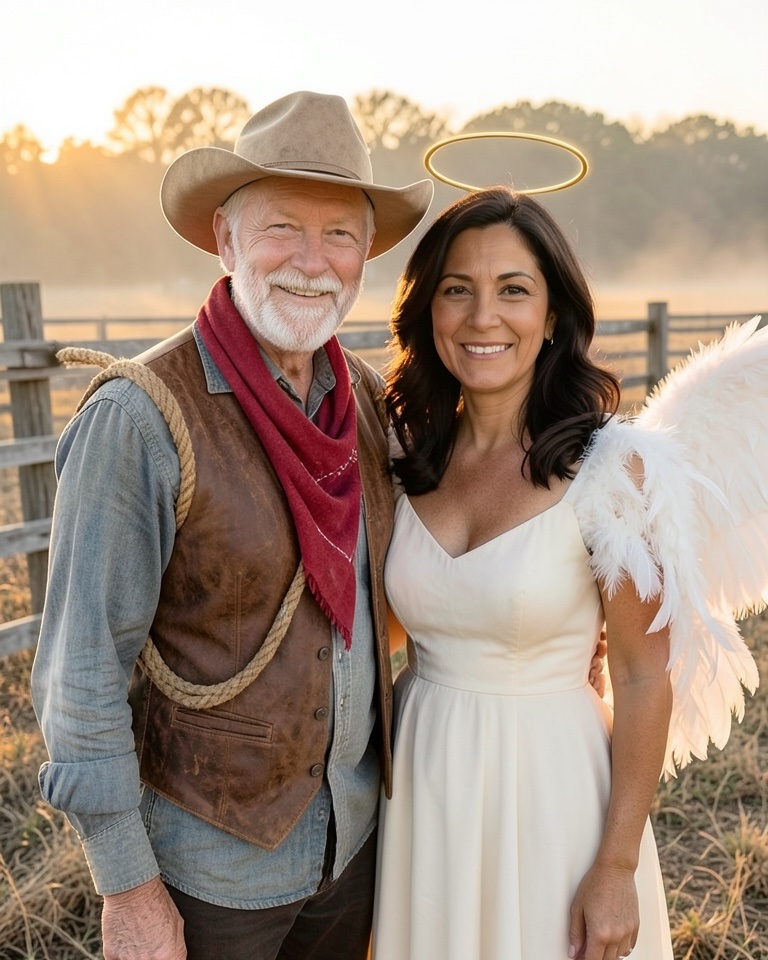
Dust Trail Cowboy & Halo Angel
The cowboys-and-angels pairing from this year's couples list: one of you in a sun-faded ranch look, the other in white feathered wings and a soft halo, at a fence line at golden hour.
Two-photo editing prompt
Combine the two reference photos into one Halloween couple photo. The person in the first image and the person in the second image stand side by side, shoulders touching, both facing the camera and smiling. Keep each person's own face, identity, skin tone, age, hair and body shape exactly as in their photo; do not swap or blend their faces. Dress the first person as a dusty cowboy: a sun-faded tan felt hat, a faded denim shirt, a brown leather vest, a red bandana loose at the neck and a rope coiled over one shoulder. Dress the second person as an angel: a flowing ivory dress, large soft white feathered wings behind the shoulders and a thin glowing gold halo floating above the head. Setting: a weathered wooden ranch fence and dry grass at golden hour, warm low sun behind, gentle haze. Realistic photograph. Avoid: a third person, extra arms or hands, logos, text, watermarks, changing anyone's skin tone.
Animate this look (image to video)
Keep both faces and costumes unchanged. The angel's wings ruffle slightly in the breeze, the cowboy tips his hat, dust motes glow in the low sun. Static camera, 5 seconds, no cuts, no text.
Sculptor & Marble Muse
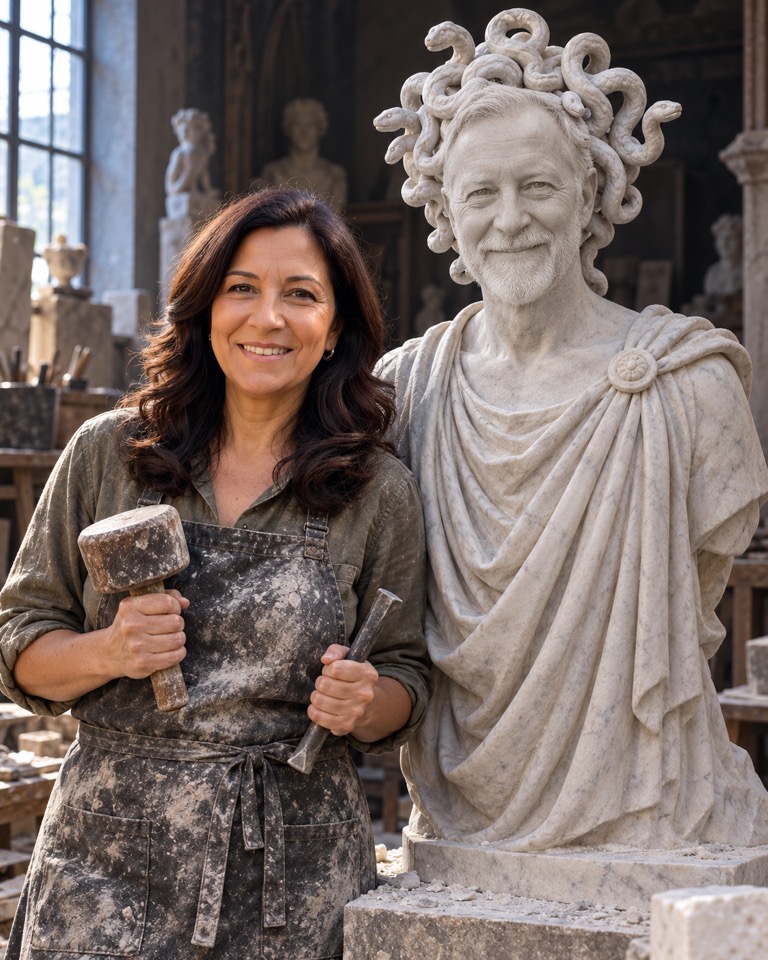
Inspired by the Medusa-and-stone-man costume, told the other way round: one of you is the sculptor in a dusty apron, the other has been turned into a pale marble statue with carved serpent curls. Tasteful, no gore.
Two-photo editing prompt
Create a Halloween couple photo from the two reference images. The person in the second image is a sculptor and the person in the first image is the finished stone statue standing beside them on a low plinth. Keep both identities, face shapes, ages and expressions recognisable; do not swap their faces. Sculptor: keep their natural skin tone and hair, add a canvas work apron dusted with white stone powder, rolled sleeves, a mallet in one hand and a chisel in the other. Statue: render the first person entirely as carved pale grey-white marble, including skin, hair and clothes, wearing a draped classical robe, with stylised carved curls on the head shaped like coiled stone serpents, eyes calm and blank like an ancient statue. Setting: a dim sculpture studio, marble chips on the floor, one tall window of cool light. Realistic photograph. Avoid: live snakes, cracks or injuries, nudity, a third person, text, logos, watermarks.
Tin Heart Robot Sweethearts
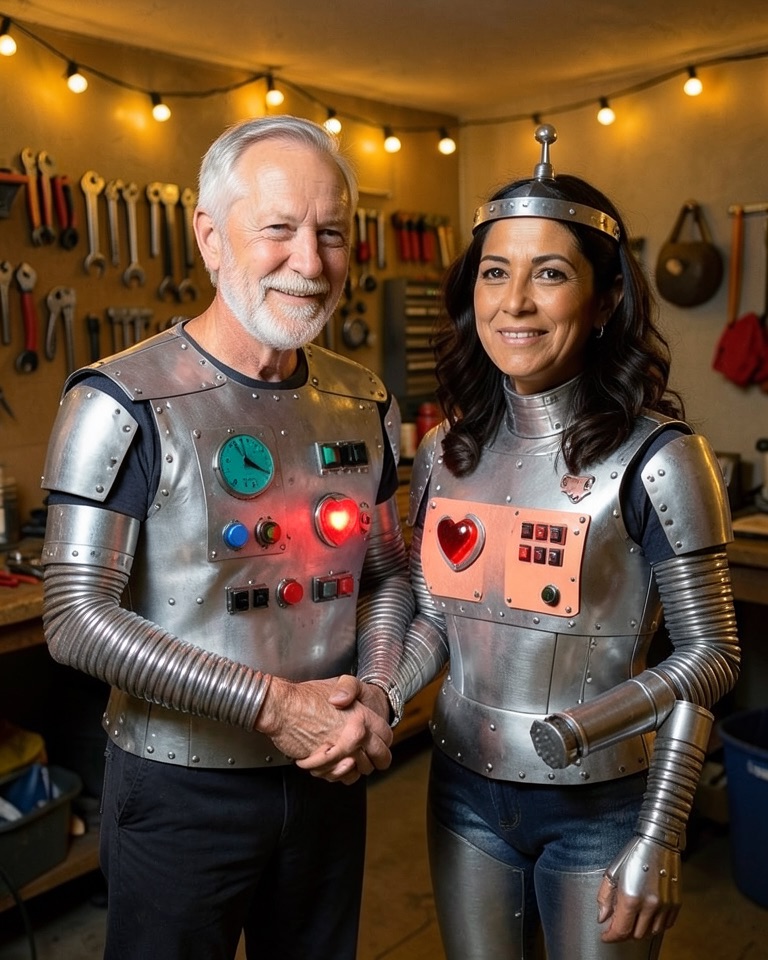
The robots-in-love couple without the film robots: two boxy, hand-built retro robot suits with faces left uncovered, holding hands, a little red heart glowing on each chest panel.
Two-photo editing prompt
Make a Halloween couple photo of the person in the first image and the person in the second image dressed as two retro robots in love, holding hands. Keep both faces fully visible and unchanged: same identity, skin tone, age, hair and expression for each person, no face swapping. Costumes: boxy hand-made robot suits built from brushed silver sheet metal and rivets, accordion-tube arms, chunky dials and toggle switches on the chest, and a small glowing red heart light in the centre of each chest panel; the first person's suit is silver with teal dials, the second person's suit is silver with coral dials; each wears a metal headband with a little antenna and bulb on top. Setting: a cosy garage workshop at night with string lights and a workbench of tools. Warm realistic photograph. Avoid: copying any film robot, helmets that hide the face, extra people, text, logos, watermarks.
Animate this look (image to video)
Keep both faces and suits unchanged. The heart lights on the chest panels pulse in sync, the antenna bulbs blink, the two turn their heads to look at each other. Static camera, 5 seconds, no cuts, no text.
Nebula Rogue & Jade Duelist
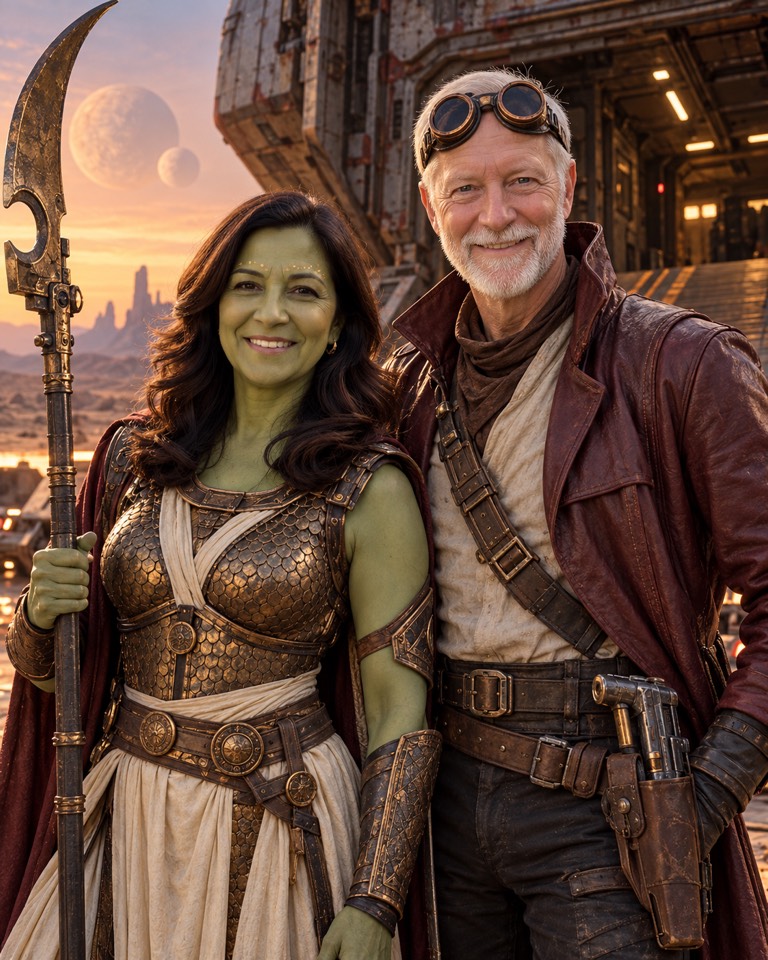
The space-outlaw-and-green-warrior pairing, redesigned: a battered leather starship captain and a jade-painted duelist in bronze scale armour with a crescent glaive, on the ramp of a cargo ship.
Two-photo editing prompt
Create a sci-fi Halloween couple photo from the two reference images. Keep both people's identities, face shapes, ages and hair recognisable, and do not swap their faces or add anyone. Dress the person in the first image as a space outlaw: a worn maroon leather long coat, a high-collared shirt, a scuffed utility belt with a blocky retro blaster in a holster and a pair of round copper goggles pushed up on the forehead. Dress the person in the second image as a green-skinned warrior: apply smooth jade-green theatrical body paint to the face, neck and arms while keeping their own features and shading, add faint gold dots along the brow line, a burnished bronze scale-armour breastplate over a long ivory tunic, bronze bracers and a tall crescent-bladed glaive held upright beside them. Setting: the lowered ramp of a rusty cargo starship at dusk on a dusty planet, two moons in the sky. Cinematic photograph. Avoid: film logos, characters' exact costumes, extra limbs, text, watermarks.
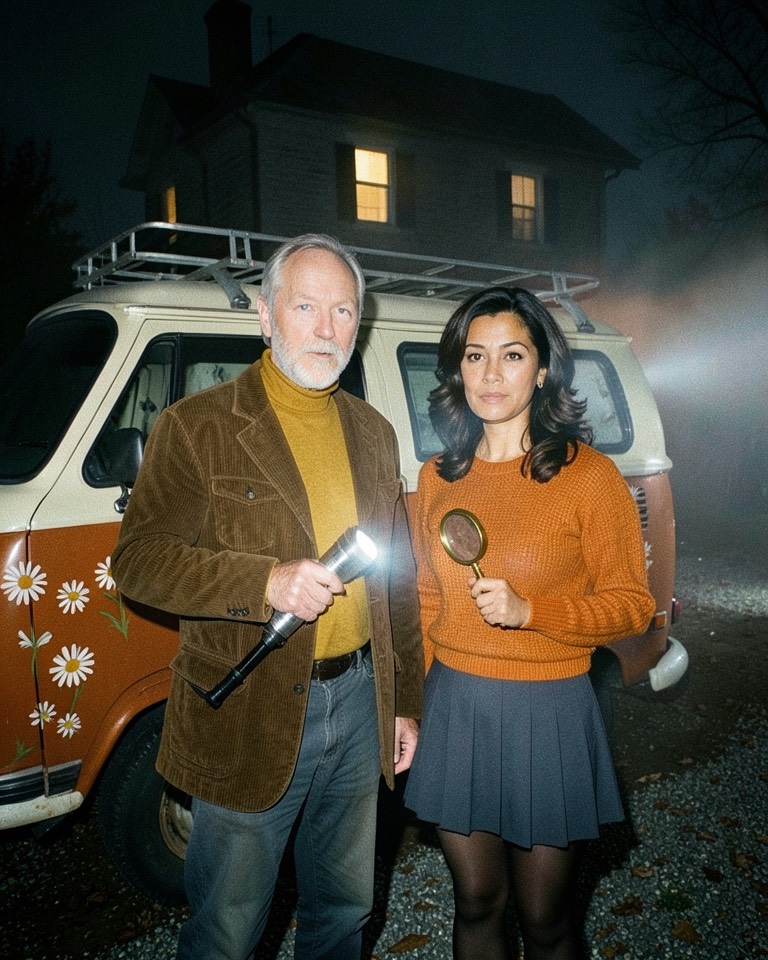
Night Shift Mystery Club
The mystery-van detective duo: 1970s outfits, a flashlight and a magnifying glass, and a painted vintage camper van behind you in the fog outside an old house.
Two-photo editing prompt
Turn the two reference photos into one Halloween couple photo of a 1970s amateur detective duo. The person in the first image and the person in the second image stand together in front of a vintage camper van, both looking slightly off-camera as if they just heard a noise. Keep each person's own face, identity, skin tone, age, hair and body shape; no face swapping, no third person, no animals. First person: a mustard turtleneck, a brown corduroy jacket and a big chrome flashlight switched on. Second person: an orange knit sweater, a short pleated skirt over dark tights and a brass magnifying glass. The van is painted burnt orange and cream with hand-painted daisies and a roof rack. Setting: a foggy gravel driveway at night with a dark old mansion in the background, one lit upstairs window, the flashlight beam cutting through the fog. Realistic film photograph with 1970s colour. Avoid: cartoon characters, logos, text on the van, watermarks.
Animate this look (image to video)
Keep both faces and outfits unchanged. The flashlight beam sweeps slowly through the fog, the upstairs window light goes out, both turn their heads toward the house. Static camera, 5 seconds, no cuts, no text.
The examples were made from two fictional AI-generated portraits during testing: three with an open image model (FLUX.2 klein) and two (Sculptor & Marble Muse, Nebula Rogue & Jade Duelist) with ChatGPT image generation — none with Qwen Image 2.1. Your result depends on your photos and the model you select.
Make your couple costume photo
"Use this look" selects Qwen Image 2.1 Edit on the free queue. Upload partner one first and partner two second (or one photo of you both), then generate. Switch to the Credits option if you do not want to wait in the queue.
Add inputsAttach images, videos, or audio that are part of what you want to create.
0/3
JPG, PNG, WebP · 20 MB max
0/3
MP4, WebM, MOV · 100 MB max
0/3
MP3, WAV, M4A, FLAC · 50 MB max
Just add the material you need. The generator will use it automatically.
0 / 5000
Generate or edit one Qwen Image 2.1 image for 1 credit. Review the credit price before submitting.
Qwen Image 2.1 Edit takes up to 3 reference images, so two separate portraits work — no need for a photo of you together.
Five original pairings inspired by this year's couples trends: cowboy and angel, sculptor and statue, retro robots, space outlaw and green warrior, a van-driving mystery duo.
Every prompt names who is who ("the person in the first image") and forbids swapping faces or adding a third person.
The free queue costs nothing; one free task per account at a time. The Credits option is 1 credit per edit and skips the queue.
Two photos or one?
Two separate portraits usually give the better result. Each face gets a full reference image to itself, and you can use the best photo of each of you rather than the one where you were both looking at the camera. Take them in similar light if you can — a sunny selfie next to a dim indoor one makes the model guess how to match them.
One photo with both of you works too, and it keeps your real height difference and how you naturally stand together. In that case "the person in the first image" means whoever is on the left. Qwen Image 2.1 Edit accepts up to three references, so you can also add a third image of a prop or a pet, and mention it in the prompt.
Upload order matters: the first image is partner one in every prompt on this page.
Front-facing, shoulders-up or waist-up, faces not covered by sunglasses or hands.
PNG, JPG or WebP, up to 10 MiB and 25 megapixels each.
Only upload photos of people who have agreed to it.
Keeping both faces your own
The usual failure in couple edits is not a bad costume, it is a face that drifts toward the other person — two people who suddenly look related. Each prompt here assigns a costume to "the first person" and "the second person" separately and says outright not to swap or blend faces. If one of you still looks off, regenerate before rewriting: identity drift varies a lot between runs.
Mention skin tones and ages if the model smooths them over. "The first person is a man in his sixties with a grey beard" anchors the result better than a long list of costume details.
Where the pairings come from
Couples searches on Google's 2026 Halloween costume trends were led by pairs from films, comics and cartoons: Cowboys and Angels, Medusa and a stone man, Wall-E and Eve, Gamora and Star-Lord, Disco Scooby and Shaggy. The looks on this page keep the idea of each pairing and redesign the costumes, so nothing here is an official character costume and the names are our own.
Free queue or credits
Qwen Image 2.1 Edit runs on a free queue on this site. Sign in, submit, and your edit waits its turn; you can have one free task queued or generating per account, and once it finishes you can start another with no daily or lifetime limit. Free tasks never spend credits.
If the queue is long the week before Halloween, pick Qwen Image 2.1 Edit · Credits instead: 1 credit per edit, run separately from the free queue, with the same up-to-3 references. Other editing models in the picker show their own prices before you generate. Animating a finished photo with one of the video prompts uses a separate video model with its own credit cost.
Frequently asked questions
Do we need a photo of us together?
No. Upload one portrait of each of you; Qwen Image 2.1 Edit accepts up to three reference images and the prompts tell it who is who. A single photo of you both also works.
Is the Halloween couple costume AI free?
Yes through the free queue: no credits, one active free task per account at a time, no daily count limit. You may wait behind other requests. The Credits option costs 1 credit per edit and runs separately.
Why does one of us look like the other?
Two faces in one edit can blend. Regenerate first, then add a sentence describing each person — age, hair, skin tone — and keep the "do not swap or blend faces" line in the prompt.
Can we add our dog?
Yes, as a third reference image. Add a sentence such as: the dog from the third image sits at their feet in a matching small costume, same breed, fur colour and markings. Three images is the maximum for this model.
Can it do same-sex couples, friends or siblings?
Yes. The prompts say "first person" and "second person", not husband and wife, so any two adults work. Swap which photo you upload first to swap the costumes.
Are these official character costumes?
No. They are original looks inspired by trending couple costumes. This site is independent and not affiliated with Alibaba, the Qwen team or any film or character owner.
Updated 2026-10-20. Independent Qwen Image 2.1 workspace. Generation and editing cost 1 credit per image. Every generation uses the model you select.